
GOSO · The platform

From field findings to completed work.

Connect field teams and contractors from the first observation to completed work.

Observations and Work Orders are included together in one GOSO package.

Observations

GOSO mobile observation feed with steelwork and staircase photos, statuses, priorities, private fields and quick interactions.

Work Orders

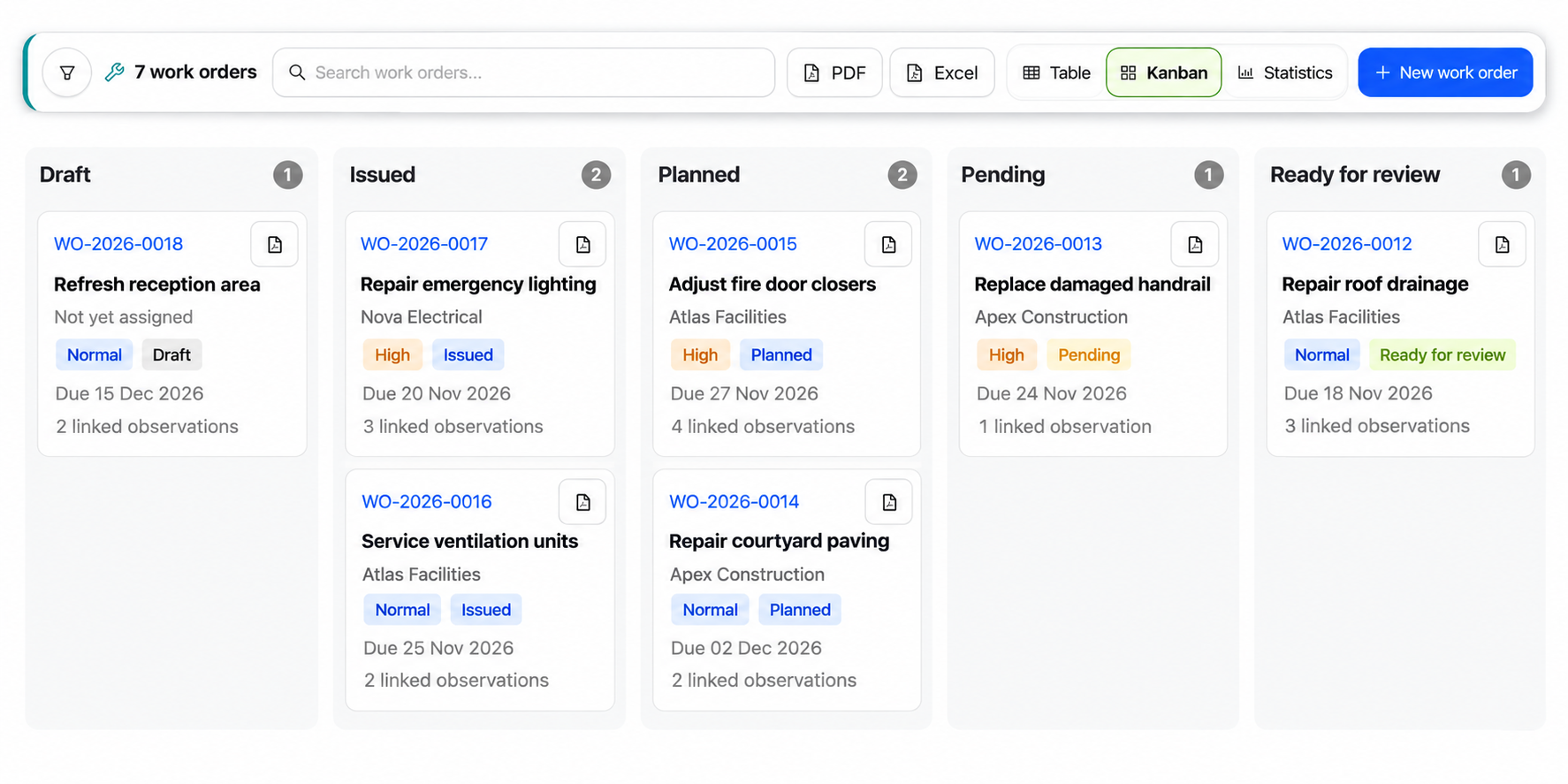
Tablet showing the GOSO Work Orders Kanban illustration: seven work orders from Draft and Issued to Planned, Pending and Ready for review, with contractors, priorities, due dates and linked observations.
Keep the finding and the response connected.Link observations to work orders. Follow responsibility, progress and completion evidence in one platform.

One platform. One package.

Two connected modules, built to work together.

Capture findings with Observations and coordinate the response with Work Orders, both included in one GOSO package.

Observations

Give every finding the context it needs.

Capture inspections, defects and field reports so the next person understands what needs attention and where.

  • Record photos, locations and structured details.
  • Organise findings with priorities, statuses and filters.
  • Explore observations in cards, tables or on a plan.
Explore Observations

Work Orders

Give every action a clear owner.

Coordinate execution with your teams and contractors, keeping the instructions and supporting documents together.

  • Link the observations relevant to the work.
  • Assign recipients and organise required documents.
  • Collect completion evidence for review and closure.
Explore Work Orders

A connected workflow

From a finding to coordinated work.

Recorded in the field or through a help desk, the observation stays linked to the work.

In the field

An inspector or contractor records a finding.

Through a help desk

An agent records a request from an occupant or user.

Observation

The finding, photos, location and history.

Observation pilot

Responsible for resolution follow-up.

Work Order

Create a new work order or link an existing one.

Issued to a contractor or internal team

Carries out the work and submits completion evidence.

Evidence reviewed before closure.

A clear point of responsibility. Assign the pilot on the Observation, independently of its author and the Work Order recipient.

The detail behind the workflow

Better information in. Clearer follow-up out.

Capture consistent data, track progress and share results.

Find the right asset

Use QR codes or NFC tags to identify assets and locations, reducing manual entry when reporting in the field.

Explore identification

Understand your observations

Review observation statuses, priorities and progress curves to see where attention is needed.

Explore observation analytics

Review the same observations as visual cards, a structured table or markers on a plan.

See the observation views

Governance

Clear responsibilities. Traceable decisions.

Control who contributes, what is shared and how work is reviewed.

Defined permissions

Control who can create, publish, assign, review and close records.

Controlled collaboration

Share relevant observations and work orders with teams, contractors and external recipients.

A history you can follow

Keep track of updates, documents, assignments and review decisions.

Explore Governance

See GOSO in practice

Bring your workflow. See how it connects.

See Observations and Work Orders in action.

Request a demo